
Comtarsia Logon Client 7.0 Software Distribution
Table of Contents
- 1. Introduction
- 2. The Logon Client MSI package
- 3. Preparation
- 3.1 Master system
- 3.2 Working folder
- 3.3 Export the MSI packages from the bundle
- 3.4 Logon Client configuration
- 3.5 Licence key
- 3.6 Certificates (optional)
- 3.7 Panel bitmap and other files (optional)
- 3.8 Target folders
- 4. Structure of the transform
- 5. Create the transform with PowerShell
- 6. Create the transform with InstEd
- 6.1 Create a new transform
- 6.2 Directory table
- 6.3 Component table
- 6.4 Import the configuration
- 6.5 Licence values
- 6.6 File table
- 6.7 Media table
- 6.8 FeatureComponents table
- 6.9 Build the cabinet
- 6.10 Save the transform
- 7. Test the transform
- 8. Installation with msiexec
- 9. Update to a new Logon Client build
- 10. Uninstallation
- 11. Migration from Logon Client 2012/2016
- 12. Notes on software distribution systems
- 12.1 Microsoft Intune (Win32 app)
- 12.2 Configuration Manager
- 12.3 Group Policy Software Installation
- 12.4 Security
- 13. Verification
- 14. Appendix A: New-LCTransform.ps1
- 15. Appendix B: Identifiers
Version: 7.0.16.1, October 26, 2026
1. Introduction
This document describes how to distribute the Comtarsia Logon Client 7.0 automatically with Windows Installer (MSI) to a large number of computers. It covers the unattended installation, the update and the uninstallation, together with the customer specific configuration, the licence key and support files such as certificates and images.
It is written for experienced Windows administrators who are familiar with msiexec, MSI tables and a software distribution system (Microsoft Intune, Configuration Manager, Group Policy Software Installation or similar).
The customer specific parts are not changed in the Comtarsia MSI package itself. They are added with a Windows Installer transform (.mst). A transform contains changes to the MSI database that Windows Installer applies during the installation. Files that the transform adds are stored in a separate cabinet file (.cab) next to the MSI.
The transform can be created in two ways:
- Scripted with the PowerShell script
New-LCTransform.ps1supplied with this document (Create the transform with PowerShell). This is the recommended way: it is repeatable, it checks the input and it does not need an MSI editor. - Manually with an MSI table editor, e.g. InstEd (https://www.instedit.com/) or Microsoft Orca from the Windows SDK (https://learn.microsoft.com/windows/win32/msi/orca-exe). This document uses InstEd (Create the transform with InstEd). An MSI editor is also useful for inspecting a transform that was created by the script.
2. The Logon Client MSI package
2.1 Package facts
| Property | Value |
|---|---|
| MSI file | Setup_LC_70_x64.msi (only a 64-bit package exists) |
| ProductName | Comtarsia Logon Client 7.0 |
| UpgradeCode | {2AC6033A-7C93-48AB-B30F-5F81D208D6A1} (the same for all 7.0 builds) |
| ProductCode | changes with every build |
| ProductVersion | Version of the Logon Client, independent of the bundle version (e.g. bundle 7.0.16.1 contains the Logon Client 7.0.9.1) |
| Feature | LC (the only feature) |
| Supported systems | Windows 10/11, Windows Server 2016/2019/2022/2025, 64-bit |
| Installation folder | C:\Program Files\Comtarsia\SignOn Solutions 7.0\ |
| Configuration | HKLM\SOFTWARE\Comtarsia\SOSProfile 001 |
| Licence key | HKLM\SOFTWARE\Comtarsia\SignOn Solutions 7.0\LicenceKeys, value 004; key file in <installation folder>\key\ |
The ProductVersion of a package can be read with PowerShell:
$i = New-Object -ComObject WindowsInstaller.Installer
$db = $i.OpenDatabase("C:\sos\Setup_LC_70_x64.msi", 0)
$v = $db.OpenView("SELECT Value FROM Property WHERE Property='ProductVersion'"); $v.Execute()
$v.Fetch().StringData(1)
2.2 What the MSI package does
- Copies the program files to
C:\Program Files\Comtarsia\SignOn Solutions 7.0\(bin,msso,cert,doc,log). - Installs and starts the service
ComtRPCSrv_70("Comtarsia RPC Service 7.0", LocalSystem, automatic start, restart on failure). - Registers the Comtarsia Credential Provider and Credential Provider Filter (CLSID
{EE234E82-AC01-4e9f-9174-E19375BED421}) and sets it asLastLoggedOnProvider. - Replaces the Winlogon
Userinitvalue (HKLM\SOFTWARE\Microsoft\Windows NT\CurrentVersion\Winlogon) withComtUserInit.exe. The original value is saved inHKLM\SOFTWARE\Comtarsia\SignOn Solutions 7.0\LogonClient\Userinitand restored when the product is uninstalled. - Creates the event log sources "Comtarsia RPC Service", "Comtarsia Userinit", "Comtarsia Credential Provider", "Comtarsia Credential Filter", "Comtarsia Event Service" and "Comtarsia SOS70".
- Installs the default certificates
ca.pem,client.pemandclient.keyinto thecertfolder. - Sets
SOSProfile 001\LogonClient\enableProxyLogon=1on the first installation. - Writes
HKLM\SOFTWARE\Comtarsia\SignOn Solutions 7.0\Components\Comtarsia Logon Client 7.0 = <ProductVersion>. - Removes an installed older Logon Client 7.0 build (major upgrade, see Update to a new Logon Client build).
- Always schedules a reboot at the end of the installation and the uninstallation (see Reboot).
2.3 What the MSI package does not do
The SignOn Solutions 7.0 bundle installer (SOS70-7.0.x.1.exe) does some work outside of the MSI package. When the MSI is installed directly, this work must be done by the transform or by the administrator:
| Bundle installer | MSI package | How to handle it in software distribution |
|---|---|---|
Copies the evaluation licence keys to <installation folder>\key\ |
No licence key is installed | The transform must contain the licence key file and LicenceKeys\004 (see Licence key). Without a valid key, the Logon Client does not work. |
Installs the Management Console (Setup_MC_70_x64.msi) together with the Logon Client |
Only the Logon Client | The Management Console is not required on the clients. Distribute Setup_MC_70_x64.msi separately where it is needed. |
| Uninstalls SignOn Solutions 2012/2016 products and migrates their folder and certificate paths | Only detects and removes Logon Client 7.0 builds | See Migration from Logon Client 2012/2016. |
| Shows one entry "Comtarsia SignOn Solutions 7.0" in "Programs and Features" | The Logon Client is shown as "Comtarsia Logon Client 7.0" | Nothing to do. |
| "Remove configuration" and "Remove licence keys" options when uninstalling | Customer values that are not part of the transform remain | See Uninstallation. |
The bundle installer has no unattended mode. For automatic distribution always use the MSI package.
3. Preparation
3.1 Master system
The prerequisite is a fully configured and tested master system. Configure the Logon Client there with the Management Console and test all logon scenarios that will be used in production. The configuration of the master system is exported and distributed to the clients.
Configure all file paths in the configuration as they will exist on the clients. Use the folders listed in Target folders, e.g. %ProgramFiles%\Comtarsia\SignOn Solutions 7.0\cert\ca_customer.pem for a customer CA certificate. The Logon Client expands environment variables in these paths.
3.2 Working folder
Create a working folder that will contain all required files, e.g. C:\sos. All examples in this document use this folder.
3.3 Export the MSI packages from the bundle
Download the current SignOn Solutions 7.0 bundle installer from https://signon.comtarsia.com/main/en/Download and run it. After accepting the licence terms, the product selection page is shown. Press "Export MSI" and select a target folder.
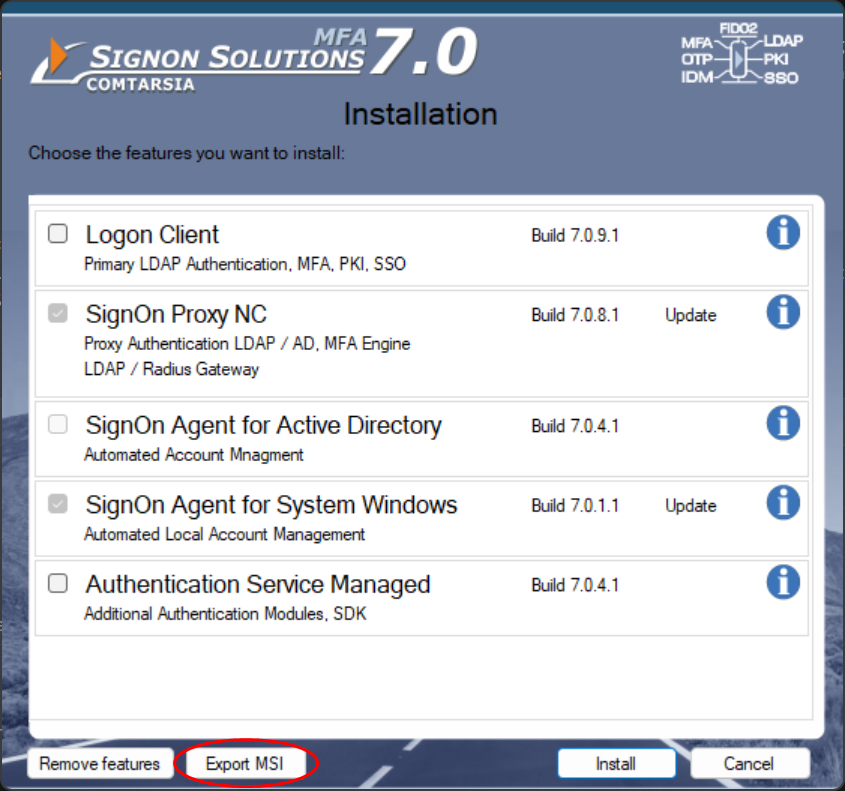
The target folder then contains:
DemoKeys\                                  evaluation licence keys
Setup_AUTHSRVM_70_x64.msi                  Authentication Service Managed
Setup_LC_70_x64.msi                        Logon Client                <- this package
Setup_MC_70_x64.msi                        Management Console
Setup_SOA_ADS_70_x64.msi                   SignOn Agent for Active Directory
Setup_SOA_SYSTEMWIN_70_x64.msi             SignOn Agent for System Windows
Setup_SOPNC_70_x64.msi                     SignOn Proxy NC
Setup_WEBMGMT_70_x64.msi                   Web Management
Setup_soa_ads_70_DefaultConfig.mst         initial configuration transforms of the server products
Setup_soa_systemwin_70_DefaultConfig.mst
Setup_sopnc_70_DefaultConfig.mst
Copy Setup_LC_70_x64.msi to the working folder. There is no initial configuration transform for the Logon Client.
3.4 Logon Client configuration
The complete Logon Client configuration is stored in HKLM\SOFTWARE\Comtarsia\SOSProfile 001. Export it on the master system from an elevated command prompt:
reg export "HKLM\SOFTWARE\Comtarsia\SOSProfile 001" C:\sos\LCConfig_SOSProfile001.reg /y /reg:64
/reg:64 makes sure that the 64-bit registry view is exported, also when the command is started from a 32-bit process.
Review the exported file before it is used:
- All file paths (
tlsCAFile,tlsCertFile,tlsKeyFile,panelBitmap, …) must point to the target folders on the clients. - Do not add other keys to this file.
HKLM\SOFTWARE\Comtarsia\SignOn Solutions 7.0belongs to the installer and to the licence handling. In particular,SignOn Solutions 7.0\LogonClient\Userinitholds the saved Windows Userinit value of the master system and must never be distributed.
3.5 Licence key
The Logon Client uses product number 004. The licence key file is named <CustomerID>-<KeyID>.key004, e.g. 12345-6789.key004. Copy the key file to the working folder.
The licence values in HKLM\SOFTWARE\Comtarsia\SignOn Solutions 7.0\LicenceKeys have the following meaning:
| Value | Meaning | Distribute? |
|---|---|---|
004 |
File name of the licence key in <installation folder>\key\. Without this value, Evaluation.key004 is used. |
Yes |
004a |
Activation code. AUTO_ACTIVATE makes the Logon Client activate the key online at the next start of the service. After a successful activation, the service replaces AUTO_ACTIVATE with the activation response code of this computer. |
Only as AUTO_ACTIVATE |
004g, 004s |
Computer specific activation and status data | No |
The licence key file shows whether an activation is required (Activation=1) and for how many computers the key is valid (ClientCopies).
Online activation: If the key requires activation, every client activates itself. The service ComtRPCSrv_70 (LocalSystem) connects to https://signon.comtarsia.com (TCP 443) with WinHTTP and the automatic proxy configuration of the computer. Make sure that the clients can reach this address at the first start after the installation. Check the proxy configuration of the system context with netsh winhttp show proxy. If the activation fails, 004a stays AUTO_ACTIVATE and the activation is retried at the next start of the service. For clients without internet access, clarify the licensing with Comtarsia before the rollout.
You do not have to export the LicenceKeys registry key. The PowerShell script creates the values 004 and 004a from the key file. With InstEd you enter them manually.
3.6 Certificates (optional)
If the Logon Client connects to the LDAP server or to the SignOn Proxy with TLS and uses its own certificates, copy the certificate files to the working folder.
The MSI package already installs ca.pem, client.pem and client.key into the cert folder. Customer certificates must have different file names, e.g. ca_customer.pem, client_customer.pem, client_customer.key. Otherwise two components would install the same file, and an update of the Logon Client would replace the customer certificate with the default certificate.
The configuration then references them, e.g.:
[HKEY_LOCAL_MACHINE\SOFTWARE\Comtarsia\SOSProfile 001\SyncClient]
"tlsCAFile"="%ProgramFiles%\\Comtarsia\\SignOn Solutions 7.0\\cert\\ca_customer.pem"
"tlsCertFile"="%ProgramFiles%\\Comtarsia\\SignOn Solutions 7.0\\cert\\client_customer.pem"
"tlsKeyFile"="%ProgramFiles%\\Comtarsia\\SignOn Solutions 7.0\\cert\\client_customer.key"
3.7 Panel bitmap and other files (optional)
If an individual logon panel bitmap or other customer files are used, copy them to the working folder. They are installed into the folder custom:
[HKEY_LOCAL_MACHINE\SOFTWARE\Comtarsia\SOSProfile 001\LogonClient]
"panelBitmap"="%ProgramFiles%\\Comtarsia\\SignOn Solutions 7.0\\custom\\logo_192x192.bmp"
3.8 Target folders
| File | Target folder on the client |
|---|---|
Licence key (*.key004) |
C:\Program Files\Comtarsia\SignOn Solutions 7.0\key\ |
| Certificates | C:\Program Files\Comtarsia\SignOn Solutions 7.0\cert\ |
| Panel bitmap, other files | C:\Program Files\Comtarsia\SignOn Solutions 7.0\custom\ |
After the preparation, the working folder contains for example:
C:\sos\Setup_LC_70_x64.msi
C:\sos\LCConfig_SOSProfile001.reg
C:\sos\12345-6789.key004
C:\sos\ca_customer.pem
C:\sos\client_customer.pem
C:\sos\client_customer.key
C:\sos\logo_192x192.bmp
4. Structure of the transform
Both methods create the same structure. The customer data is added in new components instead of existing Comtarsia components. The following table shows what the transform adds to the MSI:
| Table | Row | Purpose |
|---|---|---|
| Directory | custKeyDir (parent INSTALLDIR, key) |
Folder for the licence key |
| Directory | custFilesDir (parent INSTALLDIR, custom) |
Folder for the panel bitmap and other files |
| Component | CustomerConfig (directory INSTALLDIR, attributes 260) |
Registry values of SOSProfile 001 |
| Component | CustomerLicence (directory custKeyDir, attributes 256) |
Licence key file, LicenceKeys\004 and 004a |
| Component | CustomerCerts (directory cert, attributes 256) |
Customer certificates |
| Component | CustomerFiles (directory custFilesDir, attributes 256) |
Panel bitmap and other files |
| FeatureComponents | Feature LC with each component |
Installs the components together with the Logon Client |
| File | One row per file, sequence numbers from 1001 | Customer files |
| Media | DiskId 2, LastSequence 1000 + number of files, cabinet LCCustomer.cab |
External cabinet with the customer files |
| Registry | Configuration and licence values |
The structure is chosen for these reasons:
- Own components. The Comtarsia components and their component codes stay unchanged. The customer data can be recognised in the MSI log and in an MSI editor, and it can be changed without side effects on the program files.
- 64-bit components. Attribute 256 (
msidbComponentAttributes64bit) makes Windows Installer write the registry values into the 64-bit registry. A component without this attribute would write toHKLM\SOFTWARE\WOW6432Node\…, where the Logon Client does not read its configuration. Attribute 4 (msidbComponentAttributesRegistryKeyPath) makes a registry value the key path ofCustomerConfig. - Sequence numbers from 1001. The Comtarsia package uses sequence numbers 1–13 (Logon Client 7.0.9.1). Starting at 1001 leaves room for additional files in later builds, so the same transform also fits these builds.
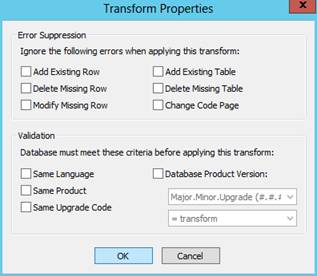
- No validation. The ProductCode changes with every build. A transform that checks the ProductCode, the version or the language would no longer apply to the next build. The transform therefore has no validation flags and no error suppression. If it does not fit a package, the installation fails with an error instead of installing an incomplete configuration.
- External cabinet. A transform cannot contain files itself. The files are stored in
LCCustomer.cab, which must be distributed in the same folder as the MSI. The cabinet name has no leading#, which marks it as an external file.
5. Create the transform with PowerShell
The script New-LCTransform.ps1 is supplied with this document (see Appendix A). It uses the Windows Installer COM interface and makecab.exe of Windows and needs no further tools. It does not change the MSI.
Run the script in a PowerShell window:
cd C:\sos
Set-ExecutionPolicy -Scope Process -ExecutionPolicy Bypass
.\New-LCTransform.ps1 -Msi .\Setup_LC_70_x64.msi -Out .\LCCustomer.mst `
    -RegFile .\LCConfig_SOSProfile001.reg -KeyFile .\12345-6789.key004 `
    -CertFile .\ca_customer.pem, .\client_customer.pem, .\client_customer.key -CustomFile .\logo_192x192.bmp
Set-ExecutionPolicy -Scope Process only applies to the current PowerShell window.
To run the script from cmd.exe or a batch file, use powershell -Command and write the whole call on one line. Do not use powershell -File: it passes all arguments as plain text, so lists of several files (-RegFile, -CertFile, -CustomFile) do not work. Put paths that contain spaces in single quotes.
cd /d C:\sos
powershell -ExecutionPolicy Bypass -Command "& .\New-LCTransform.ps1 -Msi .\Setup_LC_70_x64.msi -Out .\LCCustomer.mst -RegFile .\LCConfig_SOSProfile001.reg -KeyFile .\12345-6789.key004 -CertFile .\ca_customer.pem, .\client_customer.pem, .\client_customer.key -CustomFile .\logo_192x192.bmp"
Output:
Created 'C:\sos\LCCustomer.mst'
  registry values: <n> configuration, 2 licence
  file 1001  CustomerLicence  12345-6789.key004
  file 1002  CustomerCerts    ca_customer.pem
  file 1003  CustomerCerts    client_customer.pem
  file 1004  CustomerCerts    client_customer.key
  file 1005  CustomerFiles    logo_192x192.bmp
Created 'C:\sos\LCCustomer.cab' - deploy it in the same folder as the MSI.
| Parameter | Description |
|---|---|
-Msi |
The Logon Client MSI package. It is only read. |
-Out |
The transform to create. The cabinet is created in the same folder. |
-RegFile |
One or more .reg files (regedit format) with the configuration. |
-KeyFile |
The licence key file *.key004. The script writes LicenceKeys\004 and, if the key requires activation, 004a=AUTO_ACTIVATE. |
-NoAutoActivate |
Do not write 004a=AUTO_ACTIVATE. |
-CertFile |
Certificate files for the cert folder. |
-CustomFile |
Other files for the custom folder, e.g. the panel bitmap. |
-CabName |
Name of the cabinet, default LCCustomer.cab. |
The script converts the .reg files as follows:
REG_SZ,REG_EXPAND_SZ,REG_DWORD,REG_MULTI_SZandREG_BINARYvalues are converted into the format of the MSI Registry table.REG_QWORDcannot be written by Windows Installer and is skipped with a warning.[and]in keys, names and values are escaped as[\[]and[\]]. Windows Installer would otherwise interpret them as property references and change the value. Values that start with#are escaped as##.- Every key gets a row with the name
+, so that keys without values are also created. - Keys outside
HKEY_LOCAL_MACHINE, keys belowSOFTWARE\Comtarsia\SignOn Solutions 7.0and deletion entries ([-…],"name"=-) are skipped with a warning.
The script stops with an error if the key file is not a .key004 file, or if a certificate has the name of a certificate installed by the MSI (ca.pem, client.pem, client.key).
Test the result as described in Test the transform.
6. Create the transform with InstEd
This section creates the transform manually. The values in the tables are the ones that must be entered. <GUID> means a new GUID: In InstEd, click into the ComponentId field and press the asterisk button on the right.
6.1 Create a new transform
Open C:\sos\Setup_LC_70_x64.msi with InstEd and select "Transform > New Transform". All following changes are recorded in the transform; the MSI itself is not changed.
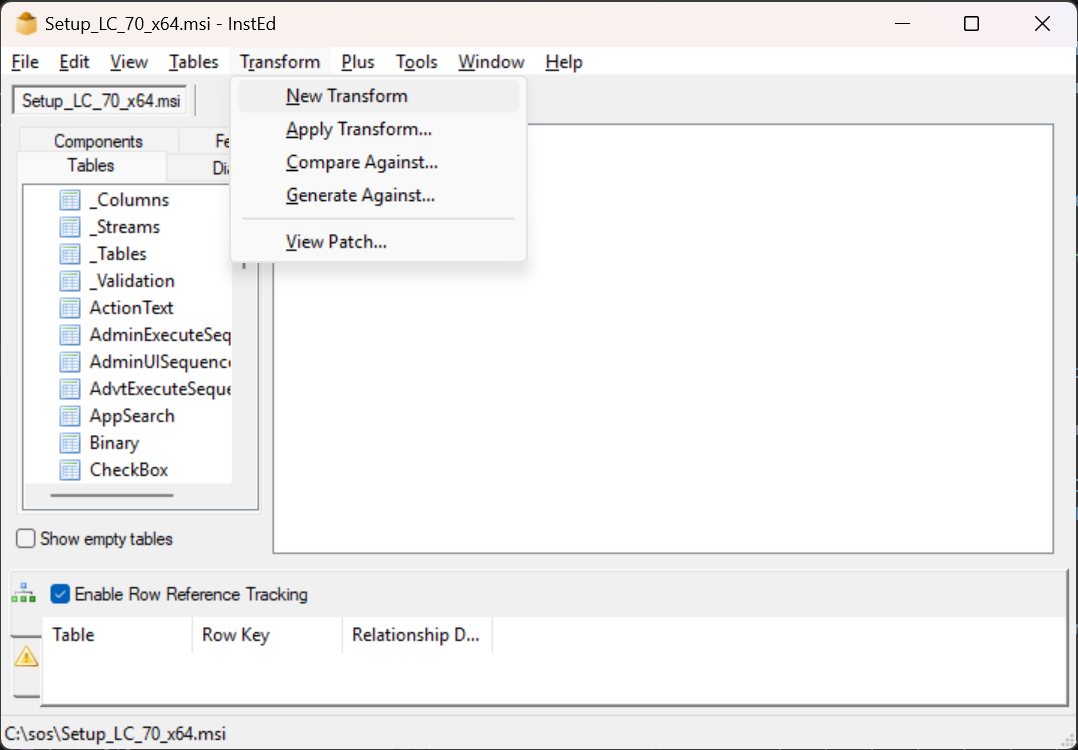
6.2 Directory table
Add these rows. Add custFilesDir only if a panel bitmap or other files are distributed.
| Directory | Directory_Parent | DefaultDir |
|---|---|---|
custKeyDir |
INSTALLDIR |
key |
custFilesDir |
INSTALLDIR |
custom |
6.3 Component table
Add these rows. Add CustomerCerts and CustomerFiles only if such files are distributed. The KeyPath of CustomerConfig is set after the import of the configuration; the KeyPath of the file components refers to the File table rows created below.
| Component | ComponentId | Directory_ | Attributes | Condition | KeyPath |
|---|---|---|---|---|---|
CustomerConfig |
<GUID> |
INSTALLDIR |
260 |
(after the import) | |
CustomerLicence |
<GUID> |
custKeyDir |
256 |
custKey |
|
CustomerCerts |
<GUID> |
cert |
256 |
custCert1 |
|
CustomerFiles |
<GUID> |
custFilesDir |
256 |
custFile1 |
6.4 Import the configuration
Switch to the "Components" view on the left, right-click the component CustomerConfig and select "Import .reg file". Select C:\sos\LCConfig_SOSProfile001.reg.
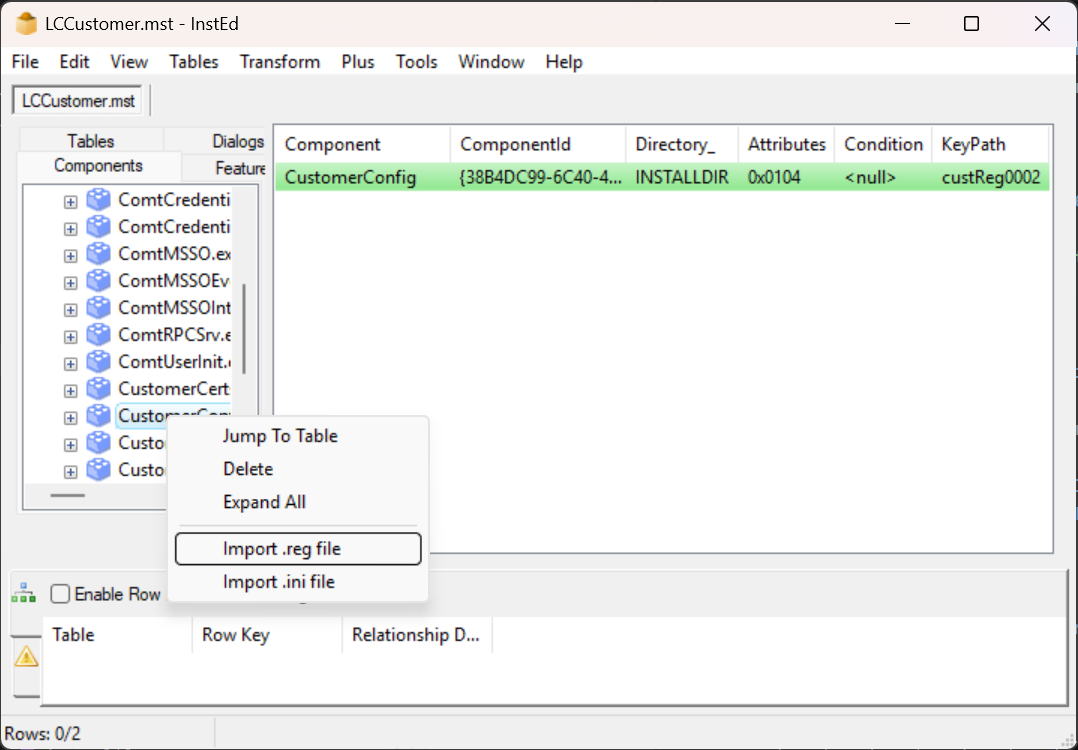
All values of the file are added to the Registry table and assigned to CustomerConfig. Check the imported rows in the Registry table:
- Values that contain
[or]must be escaped as[\[]and[\]], otherwise Windows Installer interprets them as properties. - There must be no rows below
SOFTWARE\Comtarsia\SignOn Solutions 7.0. - All rows must have
Root=2(HKLM).
Then set the KeyPath of CustomerConfig in the Component table to the Registry key of one of the imported value rows (a row with a Name and a Value).
6.5 Licence values
Add these rows to the Registry table. Add 004a only if the key requires activation (Activation=1 in the key file).
| Registry | Root | Key | Name | Value | Component_ |
|---|---|---|---|---|---|
custLic004 |
2 |
SOFTWARE\Comtarsia\SignOn Solutions 7.0\LicenceKeys |
004 |
12345-6789.key004 |
CustomerLicence |
custLic004a |
2 |
SOFTWARE\Comtarsia\SignOn Solutions 7.0\LicenceKeys |
004a |
AUTO_ACTIVATE |
CustomerLicence |
6.6 File table
Add one row per file. The sequence numbers start at 1001 and must be consecutive. FileSize is corrected automatically when the cabinet is built. Version and Language stay empty.
FileName contains the short name and the long name, separated by a vertical bar and without spaces. The table lists both names; enter them in one field, e.g. cust001.key|12345-6789.key004 for the first row.
| File | Component_ | FileName: short name | FileName: long name | FileSize | Attributes | Sequence |
|---|---|---|---|---|---|---|
custKey |
CustomerLicence |
cust001.key |
12345-6789.key004 |
0 |
512 |
1001 |
custCert1 |
CustomerCerts |
cust002.pem |
ca_customer.pem |
0 |
512 |
1002 |
custCert2 |
CustomerCerts |
cust003.pem |
client_customer.pem |
0 |
512 |
1003 |
custCert3 |
CustomerCerts |
cust004.key |
client_customer.key |
0 |
512 |
1004 |
custFile1 |
CustomerFiles |
cust005.bmp |
logo_192x192.bmp |
0 |
512 |
1005 |
6.7 Media table
Add a row for the new cabinet. LastSequence is the sequence number of the last customer file (1000 + number of files).
| DiskId | LastSequence | DiskPrompt | Cabinet | VolumeLabel | Source |
|---|---|---|---|---|---|
2 |
1005 |
LCCustomer.cab |
6.8 FeatureComponents table
Assign the new components to the feature LC:
| Feature_ | Component_ |
|---|---|
LC |
CustomerConfig |
LC |
CustomerLicence |
LC |
CustomerCerts |
LC |
CustomerFiles |
6.9 Build the cabinet
InstEd builds the cabinet from the files in the source folder structure of the MSI. Create the folders below the folder of the MSI and copy the files into them with their long names:
C:\sos\PlatformProgramFilesFolder\Comtarsia\SignOn Solutions 7.0\key\12345-6789.key004
C:\sos\PlatformProgramFilesFolder\Comtarsia\SignOn Solutions 7.0\cert\ca_customer.pem
C:\sos\PlatformProgramFilesFolder\Comtarsia\SignOn Solutions 7.0\cert\client_customer.pem
C:\sos\PlatformProgramFilesFolder\Comtarsia\SignOn Solutions 7.0\cert\client_customer.key
C:\sos\PlatformProgramFilesFolder\Comtarsia\SignOn Solutions 7.0\custom\logo_192x192.bmp
In the Media table, right-click the row with DiskId 2 and select "Show ddf". InstEd shows the definition of the cabinet. If a file is missing, InstEd shows the path where it expects the file.
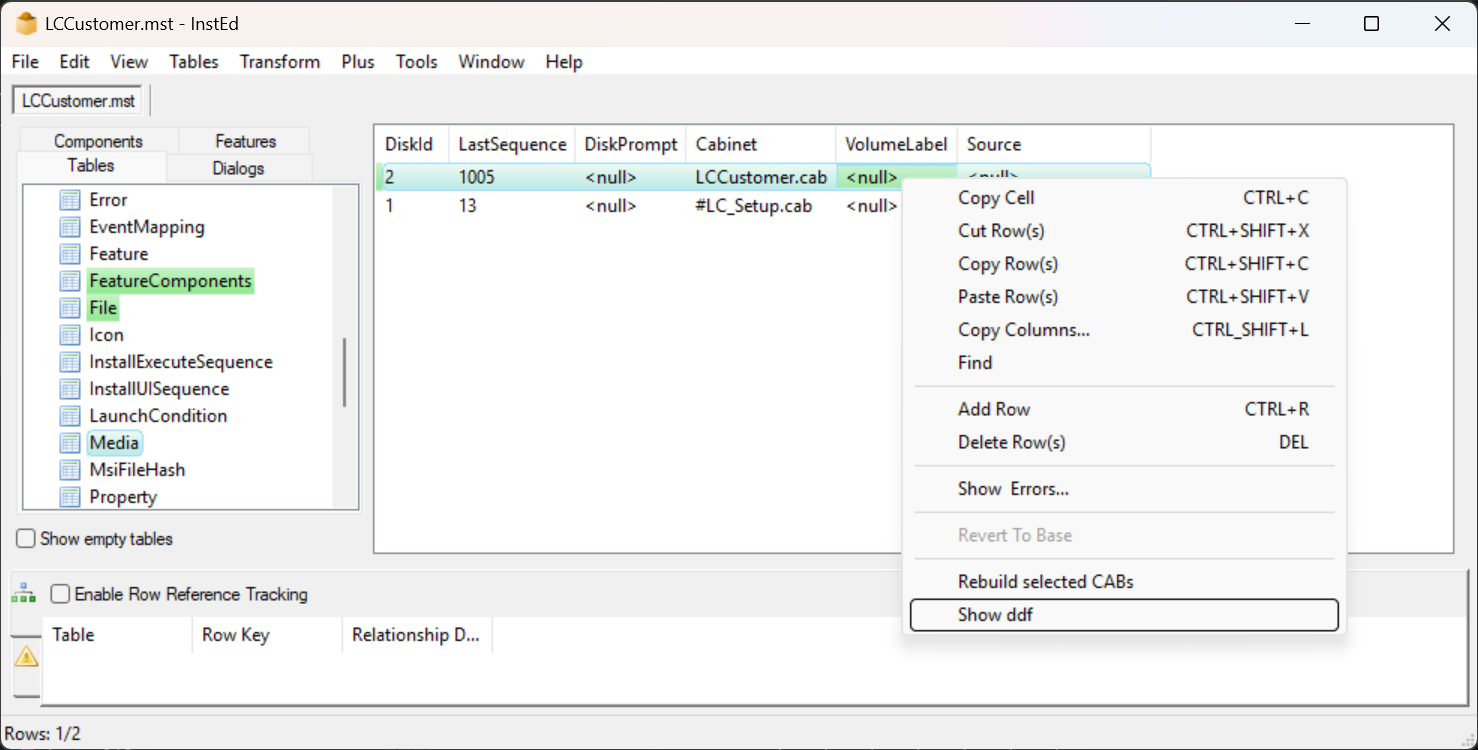
If no error is shown, right-click the row again and select "Rebuild selected CABs". InstEd creates C:\sos\LCCustomer.cab and updates the FileSize column and the MsiFileHash table.
6.10 Save the transform
Save the transform as C:\sos\LCCustomer.mst. InstEd shows the transform properties. Leave all options cleared: no error suppression and no validation, see Structure of the transform.
7. Test the transform
7.1 Check the package offline
An administrative installation extracts the package with the transform into a folder without installing anything. It shows whether the transform applies and whether the cabinet is complete:
msiexec /a C:\sos\Setup_LC_70_x64.msi TRANSFORMS=C:\sos\LCCustomer.mst TARGETDIR=C:\sos\admin /qn /l*v C:\sos\admin.log
The folder C:\sos\admin\PlatformProgramFilesFolder\Comtarsia\SignOn Solutions 7.0\ must contain the customer files in key, cert and custom. Delete C:\sos\admin afterwards.
The transform can also be opened in InstEd ("Transform > Apply Transform" after opening the MSI). The changed tables are highlighted.
7.2 Test installation
Install the package with the transform on a test computer (virtual machine with a snapshot) as described in the next chapter, first without /qn to see possible messages. After the reboot, check the installation as described in Verification.
To compare the configuration of the test computer with the master system, export it on both computers and compare the files:
reg export "HKLM\SOFTWARE\Comtarsia\SOSProfile 001" C:\sos\client.reg /y /reg:64
Compare-Object (Get-Content C:\sos\LCConfig_SOSProfile001.reg) (Get-Content C:\sos\client.reg)
8. Installation with msiexec
8.1 Package folder
The following files must be in the same folder:
Setup_LC_70_x64.msi
LCCustomer.mst
LCCustomer.cab
Windows Installer looks for the cabinet in the folder of the MSI. If the cabinet is missing, the installation fails with exit code 1603; the log shows error 1311 ("Source file not found"). Windows Installer caches the MSI and the transform on the client, but not the cabinet. A repair of the customer files therefore also needs access to the package folder.
8.2 Command line
msiexec /i Setup_LC_70_x64.msi TRANSFORMS=LCCustomer.mst /qn /norestart /l*v "%TEMP%\LC70_install.log"
Start the command in the package folder, or specify full paths for the MSI and the transform. The installation requires administrative rights; software distribution systems run it as LocalSystem.
| Parameter | Description |
|---|---|
/i <msi> |
Installs the package, or updates an installed older Logon Client 7.0 build. |
TRANSFORMS=<mst> |
Transforms to apply, separated by semicolons. Transforms can only be applied at the first installation of a product, see Change the configuration. |
/qn |
No user interface. For a first test use /qb (progress bar only) or omit it. |
/norestart |
Suppresses the reboot. Without it, the computer reboots immediately at the end of an installation with /qn. |
/l*v <log> |
Writes a verbose log. Recommended for every distribution. |
/x <msi or ProductCode> |
Uninstalls the product, see Uninstallation. |
A description of all msiexec parameters can be found here: https://learn.microsoft.com/windows-server/administration/windows-commands/msiexec
8.3 Reboot
The package always schedules a reboot (installation, update and uninstallation). The Credential Provider and the Userinit change are active after the reboot.
- With
/norestartthe installation returns 3010 (success, reboot required). The software distribution system must handle this code as success and plan the reboot. - Without
/norestartand with/qn, Windows Installer reboots the computer immediately. Logged-on users are not asked.
8.4 Exit codes
| Code | Meaning |
|---|---|
| 0 | Success |
| 3010 | Success, reboot required (normal with /norestart) |
| 1641 | Success, reboot was started |
| 1603 | Fatal error during the installation – see the log, search for "Return value 3". Error 1311 or 1335 in the log: LCCustomer.cab is missing in the package folder or is damaged |
| 1618 | Another installation is in progress – retry later |
| 1624 | Error applying the transform – path wrong or transform does not fit the package |
9. Update to a new Logon Client build
All Logon Client 7.0 builds have the same UpgradeCode, but every build has its own ProductCode. A newer build is therefore installed as a major upgrade: the new package removes the installed build completely and then installs itself.
Install a new build with the same command as the first installation. The transform and the cabinet can be reused, because the transform is not bound to a build:
msiexec /i Setup_LC_70_x64.msi TRANSFORMS=LCCustomer.mst /qn /norestart /l*v "%TEMP%\LC70_update.log"
Do not use REINSTALL=ALL REINSTALLMODE=vamus. These properties repair an installed product with the same ProductCode. They do not install a newer build.
Consequences of the major upgrade:
- Always specify the transform when updating. Without it, the customer components are removed together with the old build and not installed again: the licence key, the certificates and the configuration values of the transform are missing afterwards.
- The configuration values of the transform are removed with the old build and written again from the transform. Changes of these values on the client (e.g. with the Management Console) are overwritten by the update. Values that are not part of the transform are not changed.
LicenceKeys\004ais written again asAUTO_ACTIVATE, so the client activates its key again at the next start of the service. The client needs access tohttps://signon.comtarsia.comat this time.- The Winlogon
Userinitvalue is not restored during the upgrade and stays onComtUserInit.exe.
Clients that were installed with the bundle installer can also be updated with the MSI package and the transform.
9.1 Change the configuration
Windows Installer applies transforms only at the first installation of a product. In later maintenance operations (repair, REINSTALL) it uses the cached transform of the first installation. A changed transform can be distributed in these ways:
- With the next Logon Client build. Distribute the new build with the new transform. The major upgrade installs the new build with the new transform.
- Uninstall and install again. For the same build, uninstall the product and install it again with the new transform. A reboot is required in between.
- Outside of the MSI. Distribute values that change often with Group Policy Preferences (Registry), Intune or a script, and do not include them in the transform. Otherwise every update of the Logon Client resets them to the values of the transform.
10. Uninstallation
Because the ProductCode changes with every build, msiexec /x Setup_LC_70_x64.msi only works with the package of the installed build. To uninstall any installed Logon Client 7.0 build, determine the ProductCode with the UpgradeCode:
$installer = New-Object -ComObject WindowsInstaller.Installer
foreach ($productCode in $installer.RelatedProducts("{2AC6033A-7C93-48AB-B30F-5F81D208D6A1}"))
{
    $p = Start-Process msiexec.exe -ArgumentList "/x $productCode /qn /norestart /l*v `"$env:TEMP\LC70_uninstall.log`"" -Wait -PassThru
    exit $p.ExitCode
}
The uninstallation:
- removes the program files, the service, the Credential Provider registration and the customer components of the transform (licence key file, certificates, files, configuration values of the transform,
LicenceKeys\004and004a), - restores the Winlogon
Userinitvalue, - schedules a reboot (exit code 3010 with
/norestart).
The following remains on the computer and can be removed by a script if required:
- Values in
HKLM\SOFTWARE\Comtarsia\SOSProfile 001that are not part of the transform, e.g. values changed later with the Management Console, HKLM\SOFTWARE\Comtarsia\SignOn Solutions 7.0\LicenceKeysvalues written by the service (004g,004s),- log files in
C:\Program Files\Comtarsia\SignOn Solutions 7.0\logandmsso\log.
Do not remove HKLM\SOFTWARE\Comtarsia completely if other SignOn Solutions products are installed on the computer.
11. Migration from Logon Client 2012/2016
The Logon Client 7.0 package only detects Logon Client 7.0 builds. A Logon Client 2012 or 2016 is not removed automatically, and both versions register the same Credential Provider. Uninstall the old version first:
| Product | ProductCode (the same for all builds of the version) |
|---|---|
| Comtarsia Logon Client 2016 | {35395e49-533c-4db9-866c-e76d9445e706} |
| Comtarsia Logon Client 2012 | {C78A1DF5-1C94-41C2-9265-619998CFA842} |
msiexec /x {35395e49-533c-4db9-866c-e76d9445e706} /qn /norestart /l*v "%TEMP%\LC2016_uninstall.log"
msiexec /i Setup_LC_70_x64.msi TRANSFORMS=LCCustomer.mst /qn /norestart /l*v "%TEMP%\LC70_install.log"
Then reboot the computer.
The bundle installer additionally migrates the old installation. With the MSI package, consider the following:
- The configuration should be taken completely from a Logon Client 7.0 master system. The transform then overwrites the values of the old version.
- Licence keys of 2012/2016 (
*.key003) are not valid for 7.0. A Logon Client 7.0 key (*.key004) is required. - Paths to
…\SignOn Solutions 2012\…or…\SignOn Solutions 2016\…in the old configuration must not be used anymore. ChecktlsCAFile,tlsCertFile,tlsKeyFileandpanelBitmap. HKLM\SOFTWARE\Comtarsia\SignOn Solutions 2016(or2012) and the old folderC:\Program Files\Comtarsia\SignOn Solutions 2016(or2012) are no longer used and can be removed, as long as no other 2012/2016 product is installed.
Test the migration on a computer with the old version before the rollout.
12. Notes on software distribution systems
12.1 Microsoft Intune (Win32 app)
- Package the folder with the MSI, the transform and the cabinet with the Microsoft Win32 Content Prep Tool (
IntuneWinAppUtil.exe). Use the MSI as setup file. - Install command:
msiexec /i Setup_LC_70_x64.msi TRANSFORMS=LCCustomer.mst /qn /norestart /l*v "%ProgramData%\Microsoft\IntuneManagementExtension\Logs\LC70_install.log" - Uninstall command: the ProductCode of the packaged build (
msiexec /x {ProductCode} /qn /norestart), or the PowerShell script from Uninstallation for any build. - Install behaviour: System. Device restart behaviour: "Determine behavior based on return codes"; 3010 is a soft reboot by default.
- Detection rule: the MSI product code detects only this build. To detect "this build or newer", use a registry rule:
HKLM\SOFTWARE\Comtarsia\SignOn Solutions 7.0\Components, valueComtarsia Logon Client 7.0, version comparison "greater than or equal to" the ProductVersion of the package (see Package facts). - For a new build, create a new app and configure supersedence without uninstalling the previous version. The MSI removes the old build itself.
12.2 Configuration Manager
- Create an application with a deployment type "Windows Installer (*.msi file)". The content folder must contain the MSI, the transform and the cabinet. Add
TRANSFORMS=LCCustomer.mst /norestartto the installation program. - Use the same registry detection method as for Intune, or the ProductCode of the build.
- Configure the return code 3010 as "Soft Reboot" (default) and the reboot behaviour of the deployment.
12.3 Group Policy Software Installation
- Store the MSI, the transform and the cabinet on a share that the computer accounts can read (e.g. "Domain Computers": Read).
- Assign the package to computers and add the transform on the "Modifications" tab. Transforms can only be added when the package is created. A changed transform requires a new package.
- The installation runs at the computer start. The reboot required by the package takes place at the next start.
12.4 Security
- The transform and the cabinet contain the licence key and possibly private keys of client certificates. Restrict access to the package folder and to the distribution share.
- Windows Installer caches the transform in
C:\Windows\Installeron the client. - The
certfolder inherits the permissions ofC:\Program Files, so all users can read the files. Take this into account for private keys of client certificates.
13. Verification
Check after the installation and the reboot:
| Check | Expected result |
|---|---|
Get-Service ComtRPCSrv_70 |
Status Running |
HKLM\SOFTWARE\Comtarsia\SignOn Solutions 7.0\Components |
Comtarsia Logon Client 7.0 = ProductVersion of the package |
HKLM\SOFTWARE\Microsoft\Windows NT\CurrentVersion\Winlogon\Userinit |
C:\Program Files\Comtarsia\SignOn Solutions 7.0\bin\ComtUserInit.exe |
C:\Program Files\Comtarsia\SignOn Solutions 7.0\key\ |
Contains the licence key file |
HKLM\SOFTWARE\Comtarsia\SignOn Solutions 7.0\LicenceKeys\004 |
Name of the licence key file |
HKLM\SOFTWARE\Comtarsia\SignOn Solutions 7.0\LicenceKeys\004a |
After a successful activation: the activation response code, no longer AUTO_ACTIVATE |
HKLM\SOFTWARE\Comtarsia\SOSProfile 001 |
Same values as on the master system (see Test installation) |
| Logon screen | The Comtarsia logon tile is shown |
| Event log "Application" | No errors of the sources "Comtarsia …" |
13.1 Troubleshooting
| Problem | Cause and solution |
|---|---|
| The computer reboots immediately after the installation | /norestart is missing. |
| Exit code 1624 | The transform path is wrong, or the transform was created for another package. |
| Exit code 1603, error 1311 or 1335 in the log | LCCustomer.cab is missing in the folder of the MSI or is damaged. |
| Licence key, certificates or configuration missing after an update | The update was installed without TRANSFORMS=. Install it again with the transform. |
| Configuration values reset after an update | The values are part of the transform, see Update to a new Logon Client build. |
004a stays AUTO_ACTIVATE |
The online activation failed. Check the access to https://signon.comtarsia.com from the system context (netsh winhttp show proxy, firewall, TLS inspection) and the number of activations allowed by the key (ClientCopies). |
| The service log reports "The licence key is not valid" | Wrong key file (not *.key004), file missing in the key folder, 004 does not match the file name, or the key is not valid for this Windows version or Logon Client build. |
| Configuration values differ from the master system | Values with [ or ] were not escaped, or a REG_QWORD value was skipped. Compare the Registry table of the transform with the .reg file. |
Registry values in HKLM\SOFTWARE\WOW6432Node\Comtarsia |
The customer component has no attribute 256 (64-bit). |
| Customer certificate replaced by a default certificate | The certificate has the name of a file of the MSI (ca.pem, client.pem, client.key). Rename it. |
Search the verbose log for "Return value 3" to find the failing action. The lines before it show the cause.
14. Appendix A: New-LCTransform.ps1
# Creates a customer transform (MST) for the Comtarsia Logon Client 7.0 MSI (Setup_LC_70_x64.msi).
# The transform adds to the feature LC:
#   CustomerConfig   registry values from one or more .reg exports (e.g. HKLM\SOFTWARE\Comtarsia\SOSProfile 001)
#   CustomerLicence  the licence key file (<INSTALLDIR>\key\*.key004) and LicenceKeys\004 (+ 004a=AUTO_ACTIVATE)
#   CustomerCerts    customer certificates (<INSTALLDIR>\cert\)
#   CustomerFiles    other files, e.g. the panel bitmap (<INSTALLDIR>\custom\)
# The files are stored in an external cabinet next to the transform. Copy the cabinet next to the MSI.
# File sequence numbers start at 1001 and validation flags are 0, so the transform fits later LC 7.0 builds.
#
# Example (in a PowerShell window):
#   Set-ExecutionPolicy -Scope Process -ExecutionPolicy Bypass
#   .\New-LCTransform.ps1 -Msi .\Setup_LC_70_x64.msi -Out .\LCCustomer.mst `
#     -RegFile .\LCConfig_SOSProfile001.reg -KeyFile .\12345-6789.key004 `
#     -CertFile .\ca_customer.pem, .\client_customer.pem, .\client_customer.key -CustomFile .\logo_192x192.bmp
#
# From cmd.exe use -Command and one line. Do not use -File: it passes lists of files as plain text.
#   powershell -ExecutionPolicy Bypass -Command "& .\New-LCTransform.ps1 -Msi .\Setup_LC_70_x64.msi -Out .\LCCustomer.mst -RegFile .\LCConfig_SOSProfile001.reg -KeyFile .\12345-6789.key004"

param(
	[Parameter(Mandatory = $true)][string]$Msi,
	[Parameter(Mandatory = $true)][string]$Out,
	[string[]]$RegFile = @(),
	[string]$KeyFile,
	[string[]]$CertFile = @(),
	[string[]]$CustomFile = @(),
	[string]$CabName = "LCCustomer.cab",
	[switch]$NoAutoActivate
)

$ErrorActionPreference = "Stop"

$firstSequence = 1001
$feature = "LC"
$licenceKeyPath = "SOFTWARE\Comtarsia\SignOn Solutions 7.0\LicenceKeys"
$shippedCerts = @("ca.pem", "client.pem", "client.key")

function Invoke-Com($obj, [string]$name, [System.Reflection.BindingFlags]$kind, [object[]]$argList)
{
	return $obj.GetType().InvokeMember($name, $kind, $null, $obj, $argList)
}

function Invoke-Sql($installer, $db, [string]$sql, [object[]]$values)
{
	$rec = Invoke-Com $installer "CreateRecord" InvokeMethod @([int]$values.Length)
	for ($i = 0; $i -lt $values.Length; $i++)
	{
		if ($values[$i] -eq $null)
		{
			continue	# field stays null
		}
		elseif ($values[$i] -is [int])
		{
			Invoke-Com $rec "IntegerData" SetProperty @([int]($i + 1), [int]$values[$i]) | Out-Null
		}
		else
		{
			Invoke-Com $rec "StringData" SetProperty @([int]($i + 1), [string]$values[$i]) | Out-Null
		}
	}
	$view = Invoke-Com $db "OpenView" InvokeMethod @([string]$sql)
	Invoke-Com $view "Execute" InvokeMethod @($rec) | Out-Null
	Invoke-Com $view "Close" InvokeMethod $null | Out-Null
	[System.Runtime.InteropServices.Marshal]::ReleaseComObject($view) | Out-Null
	[System.Runtime.InteropServices.Marshal]::ReleaseComObject($rec) | Out-Null
}

# Key, Name and Value of the Registry table are Formatted: [ and ] would be resolved as properties
function ConvertTo-Formatted([string]$s)
{
	if ($s -eq $null) { return $null }
	$sb = New-Object System.Text.StringBuilder
	foreach ($c in $s.ToCharArray())
	{
		if ($c -eq '[') { [void]$sb.Append('[\[]') }
		elseif ($c -eq ']') { [void]$sb.Append('[\]]') }
		else { [void]$sb.Append($c) }
	}
	return $sb.ToString()
}

function ConvertFrom-RegHex([string]$hex)
{
	$hex = $hex -replace '[\s\\]', ''
	if ($hex -eq "") { return [byte[]]@() }
	return [byte[]]($hex.Split(',') | ForEach-Object { [Convert]::ToByte($_, 16) })
}

function ConvertFrom-RegString([string]$s)
{
	return $s.Replace('\"', '"').Replace('\\', '\')
}

# Returns Registry table rows (Key, Name, Value) for all HKLM values of a .reg file (regedit format 5.00)
function Read-RegFile([string]$path)
{
	$rows = @()
	$lines = @()
	$pending = ""
	foreach ($line in (Get-Content -LiteralPath $path))
	{
		if ($line.EndsWith("\") -and $line -notmatch '^\[')
		{
			$pending += $line.Substring(0, $line.Length - 1).Trim()
			continue
		}
		$lines += $pending + $line.Trim()
		$pending = ""
	}

	$key = $null
	foreach ($line in $lines)
	{
		if ($line -eq "" -or $line.StartsWith(";") -or $line -match '^(Windows Registry Editor|REGEDIT4)') { continue }

		if ($line -match '^\[(-?)([^\]]+)\]$')
		{
			$key = $null
			$fullKey = $Matches[2]
			if ($Matches[1] -eq "-")
			{
				Write-Warning "Key deletion ignored: $fullKey"
			}
			elseif ($fullKey -notmatch '^HKEY_LOCAL_MACHINE\\(.+)$')
			{
				Write-Warning "Only HKEY_LOCAL_MACHINE is supported, ignored: $fullKey"
			}
			else
			{
				$key = $Matches[1]
				if ($key -match '^SOFTWARE\\Comtarsia\\SignOn Solutions')
				{
					# installer owned (path, Components, LogonClient\Userinit) and LicenceKeys (machine specific, see -KeyFile)
					Write-Warning "Ignored, written by the installer or by -KeyFile: $fullKey"
					$key = $null
				}
				else
				{
					$rows += [pscustomobject]@{ Key = $key; Name = "+"; Value = $null }	# '+': creates the key, also if it has no values
				}
			}
			continue
		}

		if ($key -eq $null) { continue }

		if ($line -notmatch '^(@|"((?:[^"\\]|\\.)*)")=(.*)$')
		{
			Write-Warning "Unrecognised line ignored: $line"
			continue
		}
		$name = if ($Matches[1] -eq "@") { $null } else { ConvertFrom-RegString $Matches[2] }
		$data = $Matches[3]
		$value = $null

		if ($data -eq "-")
		{
			Write-Warning "Value deletion ignored: $key\$name"
			continue
		}
		elseif ($data -match '^"(.*)"$')
		{
			$value = ConvertTo-Formatted (ConvertFrom-RegString $Matches[1])
			if ($value.StartsWith("#")) { $value = "#" + $value }
			if ($value -eq "") { $value = $null }
		}
		elseif ($data -match '^dword:([0-9a-fA-F]{8})$')
		{
			$u = [Convert]::ToUInt32($Matches[1], 16)
			$value = "#" + [BitConverter]::ToInt32([BitConverter]::GetBytes($u), 0)
		}
		elseif ($data -match '^hex\(2\):(.*)$')
		{
			$value = "#%" + (ConvertTo-Formatted ([Text.Encoding]::Unicode.GetString((ConvertFrom-RegHex $Matches[1])).TrimEnd([char]0)))
		}
		elseif ($data -match '^hex\(7\):(.*)$')
		{
			$items = [Text.Encoding]::Unicode.GetString((ConvertFrom-RegHex $Matches[1])).TrimEnd([char]0).Split([char]0) | Where-Object { $_ -ne "" }
			# [~] at the beginning and at the end: replace the existing value
			$value = "[~]" + ((@($items) | ForEach-Object { ConvertTo-Formatted $_ }) -join "[~]") + "[~]"
			if (@($items).Count -eq 0) { $value = "[~]" }
		}
		elseif ($data -match '^hex:(.*)$')
		{
			$value = "#x" + ((ConvertFrom-RegHex $Matches[1] | ForEach-Object { $_.ToString("X2") }) -join "")
		}
		else
		{
			Write-Warning "Value type not supported by Windows Installer, ignored: $key\$name = $data"
			continue
		}

		$rows += [pscustomobject]@{ Key = $key; Name = (ConvertTo-Formatted $name); Value = $value }
	}
	return $rows
}

# File table entries for the customer files: component, directory, sequence
$files = @()
function Add-CustomerFile([string]$path, [string]$component)
{
	$fi = Get-Item -LiteralPath $path
	$index = $script:files.Count + 1
	$ext = $fi.Extension.TrimStart('.')
	if ($ext.Length -gt 3) { $ext = $ext.Substring(0, 3) }
	$short = ("cust{0:D3}" -f $index) + $(if ($ext -ne "") { "." + $ext } else { "" })
	$script:files += [pscustomobject]@{
		Key = "cust{0:D3}_{1}" -f $index, ($fi.Name -replace '[^A-Za-z0-9_.]', '_')
		Path = $fi.FullName
		Name = $fi.Name
		FileName = "$short|$($fi.Name)"
		Size = [int]$fi.Length
		Component = $component
		Sequence = $firstSequence + $index - 1
	}
}

$regRows = @()
foreach ($rf in $RegFile)
{
	$regRows += Read-RegFile (Resolve-Path $rf).Path
}

$licenceRows = @()
if ($KeyFile)
{
	$kf = Get-Item -LiteralPath $KeyFile
	if ($kf.Extension -ne ".key004")
	{
		throw "The Logon Client 7.0 needs a licence key for product 004 (*.key004): '$($kf.Name)'"
	}
	Add-CustomerFile $kf.FullName "CustomerLicence"
	$licenceRows += [pscustomobject]@{ Key = $licenceKeyPath; Name = "004"; Value = (ConvertTo-Formatted $kf.Name) }
	$requiresActivation = (Get-Content -LiteralPath $kf.FullName) -contains "Activation=1"
	if ($requiresActivation -and -not $NoAutoActivate)
	{
		$licenceRows += [pscustomobject]@{ Key = $licenceKeyPath; Name = "004a"; Value = "AUTO_ACTIVATE" }
	}
	elseif ($requiresActivation)
	{
		Write-Warning "The key requires activation, but 004a=AUTO_ACTIVATE is not written (-NoAutoActivate)."
	}
}
foreach ($cf in $CertFile)
{
	$name = Split-Path $cf -Leaf
	if ($shippedCerts -contains $name.ToLower())
	{
		throw "'$name' is installed by the MSI itself. Rename the customer certificate (e.g. ca_customer.pem) and adjust tlsCAFile/tlsCertFile/tlsKeyFile."
	}
	Add-CustomerFile $cf "CustomerCerts"
}
foreach ($cf in $CustomFile)
{
	Add-CustomerFile $cf "CustomerFiles"
}

if ($regRows.Count -eq 0 -and $files.Count -eq 0)
{
	throw "Nothing to add: specify -RegFile, -KeyFile, -CertFile or -CustomFile."
}

$msiPath = (Resolve-Path $Msi).Path
$outPath = $ExecutionContext.SessionState.Path.GetUnresolvedProviderPathFromPSPath($Out)
$outDir = Split-Path $outPath -Parent
$cabPath = Join-Path $outDir $CabName
$tmpPath = Join-Path ([System.IO.Path]::GetTempPath()) ("newlctransform_" + [guid]::NewGuid().ToString() + ".msi")
Copy-Item $msiPath $tmpPath

$installer = New-Object -ComObject WindowsInstaller.Installer
$refDb = $null
$db = $null
try
{
	$refDb = Invoke-Com $installer "OpenDatabase" InvokeMethod @([string]$msiPath, 0)	# msiOpenDatabaseModeReadOnly
	$db = Invoke-Com $installer "OpenDatabase" InvokeMethod @([string]$tmpPath, 1)		# msiOpenDatabaseModeTransact

	$view = Invoke-Com $db "OpenView" InvokeMethod @("SELECT ``LastSequence``, ``DiskId`` FROM ``Media``")
	Invoke-Com $view "Execute" InvokeMethod $null | Out-Null
	$maxSequence = 0; $maxDiskId = 0
	while (($rec = Invoke-Com $view "Fetch" InvokeMethod $null) -ne $null)
	{
		$maxSequence = [Math]::Max($maxSequence, (Invoke-Com $rec "IntegerData" GetProperty @(1)))
		$maxDiskId = [Math]::Max($maxDiskId, (Invoke-Com $rec "IntegerData" GetProperty @(2)))
	}
	Invoke-Com $view "Close" InvokeMethod $null | Out-Null
	if ($maxSequence -ge $firstSequence)
	{
		throw "The MSI already uses file sequence numbers up to $maxSequence, the customer files start at $firstSequence."
	}

	# 256 = msidbComponentAttributes64bit, 4 = msidbComponentAttributesRegistryKeyPath
	$regIndex = 0
	$allRegRows = @($regRows | ForEach-Object { $_ | Add-Member -NotePropertyName Component -NotePropertyValue "CustomerConfig" -PassThru }) +
		@($licenceRows | ForEach-Object { $_ | Add-Member -NotePropertyName Component -NotePropertyValue "CustomerLicence" -PassThru })
	$configKeyPath = $null
	foreach ($r in $allRegRows)
	{
		$regIndex++
		$id = "custReg{0:D4}" -f $regIndex
		if ($r.Component -eq "CustomerConfig" -and $configKeyPath -eq $null -and $r.Name -ne $null -and $r.Value -ne $null) { $configKeyPath = $id }
		Invoke-Sql $installer $db "INSERT INTO ``Registry`` (``Registry``, ``Root``, ``Key``, ``Name``, ``Value``, ``Component_``) VALUES (?, ?, ?, ?, ?, ?)" `
			@($id, 2, (ConvertTo-Formatted $r.Key), $r.Name, $r.Value, $r.Component)	# 2 = HKLM
	}

	if ($regRows.Count -gt 0)
	{
		if ($configKeyPath -eq $null) { throw "The .reg files contain no value that can be used as key path." }
		Invoke-Sql $installer $db "INSERT INTO ``Component`` (``Component``, ``ComponentId``, ``Directory_``, ``Attributes``, ``KeyPath``) VALUES (?, ?, ?, ?, ?)" `
			@("CustomerConfig", ("{" + [guid]::NewGuid().ToString().ToUpper() + "}"), "INSTALLDIR", 260, $configKeyPath)
	}

	$dirs = @{ "CustomerLicence" = "custKeyDir"; "CustomerCerts" = "cert"; "CustomerFiles" = "custFilesDir" }
	if ($files | Where-Object Component -eq "CustomerLicence")
	{
		Invoke-Sql $installer $db "INSERT INTO ``Directory`` (``Directory``, ``Directory_Parent``, ``DefaultDir``) VALUES (?, ?, ?)" @("custKeyDir", "INSTALLDIR", "key")
	}
	if ($files | Where-Object Component -eq "CustomerFiles")
	{
		Invoke-Sql $installer $db "INSERT INTO ``Directory`` (``Directory``, ``Directory_Parent``, ``DefaultDir``) VALUES (?, ?, ?)" @("custFilesDir", "INSTALLDIR", "custom")
	}
	foreach ($component in @("CustomerLicence", "CustomerCerts", "CustomerFiles"))
	{
		$cfiles = @($files | Where-Object Component -eq $component)
		if ($cfiles.Count -eq 0) { continue }
		Invoke-Sql $installer $db "INSERT INTO ``Component`` (``Component``, ``ComponentId``, ``Directory_``, ``Attributes``, ``KeyPath``) VALUES (?, ?, ?, ?, ?)" `
			@($component, ("{" + [guid]::NewGuid().ToString().ToUpper() + "}"), $dirs[$component], 256, $cfiles[0].Key)
	}

	foreach ($component in @("CustomerConfig", "CustomerLicence", "CustomerCerts", "CustomerFiles"))
	{
		if ((@($allRegRows | Where-Object Component -eq $component).Count + @($files | Where-Object Component -eq $component).Count) -eq 0) { continue }
		Invoke-Sql $installer $db "INSERT INTO ``FeatureComponents`` (``Feature_``, ``Component_``) VALUES (?, ?)" @($feature, $component)
	}

	if ($files.Count -gt 0)
	{
		foreach ($f in $files)
		{
			Invoke-Sql $installer $db "INSERT INTO ``File`` (``File``, ``Component_``, ``FileName``, ``FileSize``, ``Attributes``, ``Sequence``) VALUES (?, ?, ?, ?, ?, ?)" `
				@($f.Key, $f.Component, $f.FileName, $f.Size, 512, $f.Sequence)	# 512 = msidbFileAttributesVital
		}
		Invoke-Sql $installer $db "INSERT INTO ``Media`` (``DiskId``, ``LastSequence``, ``Cabinet``) VALUES (?, ?, ?)" `
			@(($maxDiskId + 1), ($firstSequence + $files.Count - 1), $CabName)	# no leading '#': external cabinet next to the MSI

		# the cabinet must contain the files in sequence order, named by their File table key
		$ddf = Join-Path ([System.IO.Path]::GetTempPath()) ("newlctransform_" + [guid]::NewGuid().ToString() + ".ddf")
		$ddfLines = @(
			".OPTION EXPLICIT",
			".Set CabinetNameTemplate=$CabName",
			".Set DiskDirectoryTemplate=$outDir",
			".Set Cabinet=on",
			".Set Compress=on",
			".Set CompressionType=MSZIP",
			".Set MaxDiskSize=0",
			".Set RptFileName=nul",
			".Set InfFileName=nul"
		) + ($files | Sort-Object Sequence | ForEach-Object { '"' + $_.Path + '" "' + $_.Key + '"' })
		Set-Content -Path $ddf -Value $ddfLines -Encoding ASCII
		if (Test-Path $cabPath) { Remove-Item $cabPath }
		& makecab.exe /F $ddf | Out-Null
		$rc = $LASTEXITCODE
		Remove-Item $ddf -ErrorAction SilentlyContinue
		if ($rc -ne 0 -or -not (Test-Path $cabPath)) { throw "makecab failed ($rc)" }
	}

	Invoke-Com $db "Commit" InvokeMethod $null | Out-Null

	if (Test-Path $outPath)
	{
		Remove-Item $outPath
	}
	Invoke-Com $db "GenerateTransform" InvokeMethod @($refDb, [string]$outPath) | Out-Null
	Invoke-Com $db "CreateTransformSummaryInfo" InvokeMethod @($refDb, [string]$outPath, 0, 0) | Out-Null	# no error suppression, no validation

	Write-Host "Created '$outPath'"
	Write-Host ("  registry values: {0} configuration, {1} licence" -f @($regRows | Where-Object Name -ne "+").Count, $licenceRows.Count)
	foreach ($f in $files)
	{
		Write-Host ("  file {0,-5} {1,-16} {2}" -f $f.Sequence, $f.Component, $f.Name)
	}
	if ($files.Count -gt 0)
	{
		Write-Host "Created '$cabPath' - deploy it in the same folder as the MSI."
	}
}
finally
{
	if ($db -ne $null) { [System.Runtime.InteropServices.Marshal]::ReleaseComObject($db) | Out-Null }
	if ($refDb -ne $null) { [System.Runtime.InteropServices.Marshal]::ReleaseComObject($refDb) | Out-Null }
	[System.Runtime.InteropServices.Marshal]::ReleaseComObject($installer) | Out-Null
	Remove-Item $tmpPath -ErrorAction SilentlyContinue
}
15. Appendix B: Identifiers
| Item | Value |
|---|---|
| UpgradeCode Logon Client 7.0 | {2AC6033A-7C93-48AB-B30F-5F81D208D6A1} |
| Credential Provider / Filter CLSID | {EE234E82-AC01-4e9f-9174-E19375BED421} |
| Service | ComtRPCSrv_70 ("Comtarsia RPC Service 7.0") |
| Licence product number | 004 |
| Configuration profile | HKLM\SOFTWARE\Comtarsia\SOSProfile 001 |
| ProductCode Logon Client 2016 | {35395e49-533c-4db9-866c-e76d9445e706} |
| ProductCode Logon Client 2012 | {C78A1DF5-1C94-41C2-9265-619998CFA842} |